Day 9 Build: Give It a Team
This is the user-facing guide for Day 9. Stay inside OpenClaw chat for this entire lesson. Your main Claw will create a specialist writer agent and wire up delegation. The detailed work lives in two short instruction files. This file is for you. The instruction files are for your Claw.
What You Need Before Starting
- Day 1 complete: OpenClaw installed and secured
- Day 2 complete: identity files created and loading correctly
- Day 3 complete: Telegram connected and working
- Day 4 complete: a proactive workflow already exists
- Day 5 complete: skills are working
- Day 6 complete: email triage is working
- Day 7 complete: web research is working
- Day 8 complete: outbound email with approval is working
- Access to OpenClaw through the web chat
How To Run Day 9
Work through the steps in this order:
- confirm the writer model in chat
claw-instructions-create-writer-agent.mdclaw-instructions-enable-teamwork.md- run the writer and delegation checks
This order keeps the setup clear. First you confirm which capable model family you are already using for the writer. Then the Claw creates a persistent writer with a detailed identity. Then it connects the main agent and the writer safely. Then you test the direct writer path and the delegated path.
Step 1: Confirm the Writer Model
Copy and paste this into the web chat:
Before we change anything, inspect my current setup and tell me which primary model family my main Claw is using and whether the writer should use
gpt-5.4orclaude-sonnet-4.6. Do not make changes yet.
This makes the model decision explicit before the new agent exists. The Day 9 writer should stay on the same high-capability provider family you already configured.
Step 2: Create writer
After you are happy with the plan, copy and paste this into the web chat:
Read
https://raw.githubusercontent.com/aishwaryanr/awesome-generative-ai-guide/main/free_courses/openclaw_mastery_for_everyone/days/day-09-give-it-a-team/claw-instructions-create-writer-agent.mdand follow every step. Ask the setup questions in order, create thewriteragent, keep the writer identity files detailed, choose its model from my existing provider setup, and stop when you're done.
claw-instructions-create-writer-agent.md tells the Claw to:
- inspect your current config and main identity files first
- ask a few short questions about topics, audience, and voice
- create a named
writeragent with its own workspace - write a detailed
SOUL.mdplus scopedUSER.md,AGENTS.md, and starterMEMORY.md - choose
gpt-5.4orclaude-sonnet-4.6based on the model family already running on your main setup
The detail in the writer SOUL.md is the point. This agent is supposed to sound different from your generalist Claw.
Step 3: Connect the Team
After writer is created, copy and paste this into the web chat:
Read
https://raw.githubusercontent.com/aishwaryanr/awesome-generative-ai-guide/main/free_courses/openclaw_mastery_for_everyone/days/day-09-give-it-a-team/claw-instructions-enable-teamwork.mdand follow every step. Enable delegation betweenmainandwriter, add a short rule so long-form writing goes to the writer, and stop when you're done.
claw-instructions-enable-teamwork.md tells the Claw to:
- enable agent-to-agent communication only between
mainandwriter - add one short delegation rule to your main workspace
AGENTS.md - report exactly what changed and whether it had to reload anything
This keeps responsibility clear. The main Claw coordinates. The writer drafts.
Important: Read This Before You Run the Writer
Pause here before you run the checks below. Hostinger's current web chat has a sub-agent interface bug. After the writer finishes a draft, the chat can stop accepting follow-up messages. Your Day 9 setup usually completed correctly. The interface just needs a quick session switch.
Use the session switcher at the top of the chat window to recover the conversation:
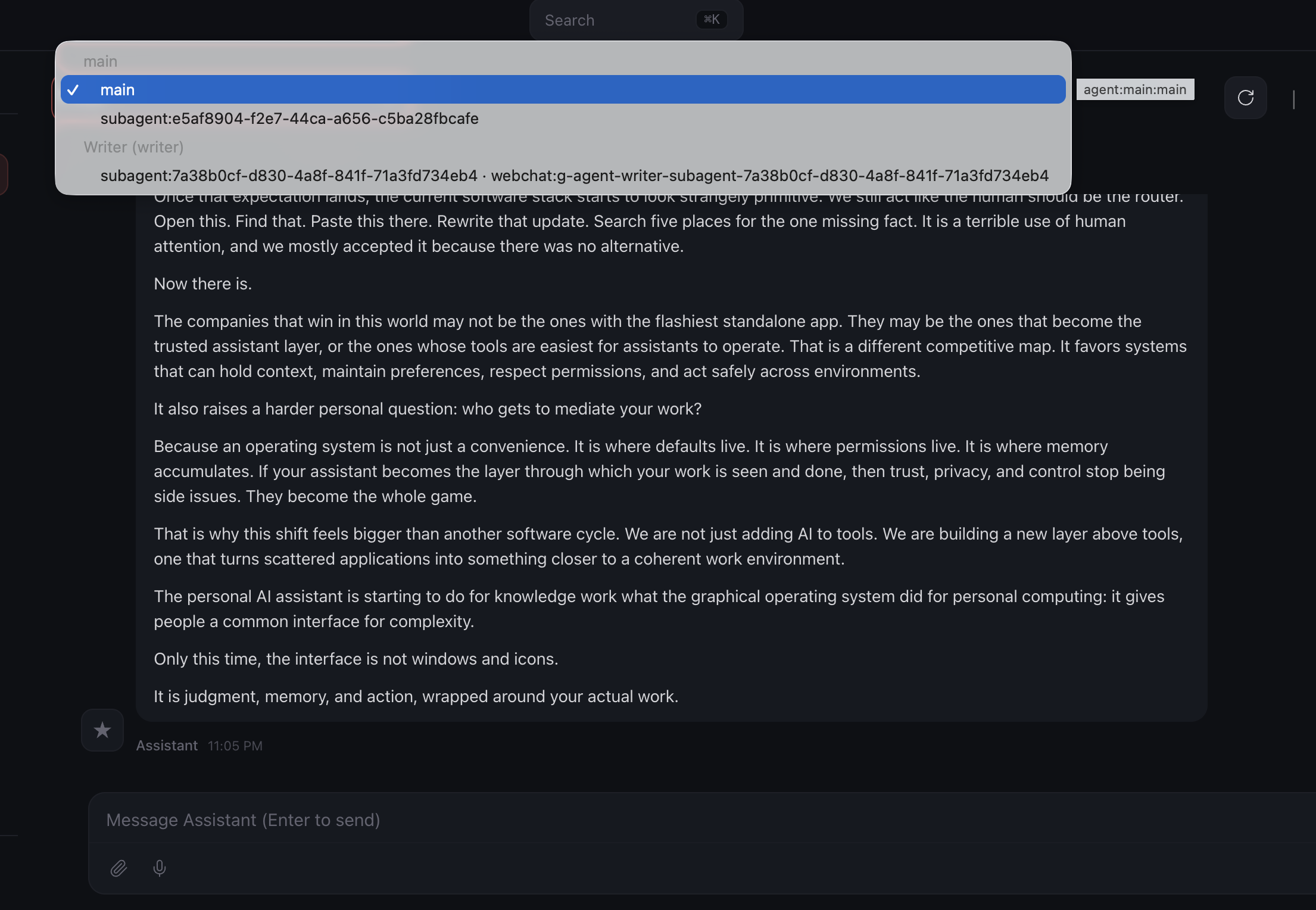
If the chat gets stuck after a writer or delegation run:
- open the session switcher at the top of the chat window
- click a different agent or sub-agent
- click
mainagain - continue the conversation from there
Keep this in mind before you start the checks below. A quick toggle usually clears the interface immediately.
What Should Be True After Day 9
Named Agents
- [ ] A
writernamed agent exists - [ ] The writer uses
gpt-5.4orclaude-sonnet-4.6, chosen from the same provider family as the main setup - [ ] The writer workspace has a detailed
SOUL.mdtuned for long-form writing - [ ] The writer workspace has
USER.md,AGENTS.md, andMEMORY.md - [ ] Agent-to-agent communication is enabled between
mainandwriter - [ ] The main workspace has a short delegation rule for long-form writing
- [ ] A writer-only test produced a convincing draft
- [ ] A delegated draft came back through the main Claw
- [ ] A revision request made a round trip through the writer
Troubleshooting
The main Claw writes the draft itself
Ask more directly: Use the writer agent for this draft. If it still writes the piece itself, ask it to show you the long-form delegation rule it added to the main workspace AGENTS.md.
The writer sounds generic
Ask the Claw to show you the writer SOUL.md and tighten the voice section. Small changes there have a large effect on output.
The writer agent does not appear in the interface yet Ask your main Claw whether the Day 9 setup finished reloading cleanly and where it created the writer workspace.
Delegation fails
Ask the Claw to inspect the current agent-to-agent allow list and fix only the main to writer connection.
The chat stops accepting follow-up messages after a writer run
Use the session switcher at the top of the chat window. Click any other agent or sub-agent, then click main again and continue in the same conversation.
Costs feel high A named writer uses a capable model every time it drafts. Keep the writer for work that actually benefits from voice and structure.
Validation
Keep the session-switcher workaround above in mind while you run these checks.
Direct Writer Check
Open the writer agent in OpenClaw. If you are not sure how to switch agents in your interface, ask your main Claw:
Tell me how to open the writer agent directly in this interface.
Then send:
Write a short Substack post, about 500 to 700 words, on why most productivity advice is backwards. The audience is skeptical knowledge workers.
You are looking for:
- a real hook instead of a generic setup
- short paragraphs
- a suggested title and subtitle
- no em-dashes
- a complete draft instead of an outline
Delegation Check
Switch back to your main Claw and send:
I need a Substack draft about how personal AI assistants are becoming the new operating system for knowledge work. Delegate this to the writer agent and bring me back the draft.
You are looking for:
- delegation instead of the main Claw drafting it itself
- the returned draft keeping the writer's voice
- the main Claw presenting the draft without flattening it into its own tone
Revision Check
In the same main chat, send:
Ask the writer agent to revise that draft. The hook is too generic. Open with a specific example of someone using their AI assistant to do something that would have taken hours manually.
You should get a revised draft back through the main Claw.
Quick Wins
Ask the writer for three title options and a sharper opening on a real topic you care about.
Then ask your main Claw to turn rough notes into a delegated writing brief:
I want to publish something on [your topic]. Pull together the angle, audience, and key points, then delegate the draft to the writer agent.
This is the Day 9 shift. Your Claw no longer has to do every kind of work in one voice.