Day 4 Build: Make It Proactive
This is the user-facing guide for Day 4. Today you schedule a daily reflection so your Claw messages you first, at the exact time you choose.
The operational steps live in claw-instructions-create-daily-reflection-cron.md. This file is for you. The instruction file is for your Claw.
What You Need Before Starting
- Day 1 complete: OpenClaw installed and secured
- Day 2 complete: identity files created and loading correctly
- Day 3 complete: Telegram connected and working
- Access to your Claw through the web chat
- Telegram on your phone
Step 1: Start the Setup in Web Chat
Copy and paste the following message into the web chat:
Read
https://raw.githubusercontent.com/aishwaryanr/awesome-generative-ai-guide/main/free_courses/openclaw_mastery_for_everyone/days/day-04-make-it-proactive/claw-instructions-create-daily-reflection-cron.mdand follow every step. Ask me only for the decisions you still need, create the cron job, and stop when you're done.
claw-instructions-create-daily-reflection-cron.md tells the Claw to:
- reuse the context it already knows about you
- propose a few reflection-question options instead of making you start from scratch
- create a recurring cron job at your chosen time
- bind that job to the current session
- deliver the reflection explicitly to Telegram
At a high level, here is what you are doing:
- choose when you want the reflection to arrive
- pick the version of the reflection that feels most useful
- let the Claw schedule it as a recurring cron job
- see exactly how it is configured
This is the first day your Claw reaches out on its own, on a real schedule.
What the Claw Should Ask You For
Keep this simple. The Claw should mainly need two decisions from you:
- what time you want the reflection
- which reflection option you want
It should reuse the timezone and other context if it already has them, then create the cron job for you.
What You Should See
Once the cron job is created, the Claw should clearly tell you what it set up: the schedule, timezone, session target, and Telegram destination.
If you want to inspect or run it manually, you can also use the Cron Jobs tab in Hostinger:
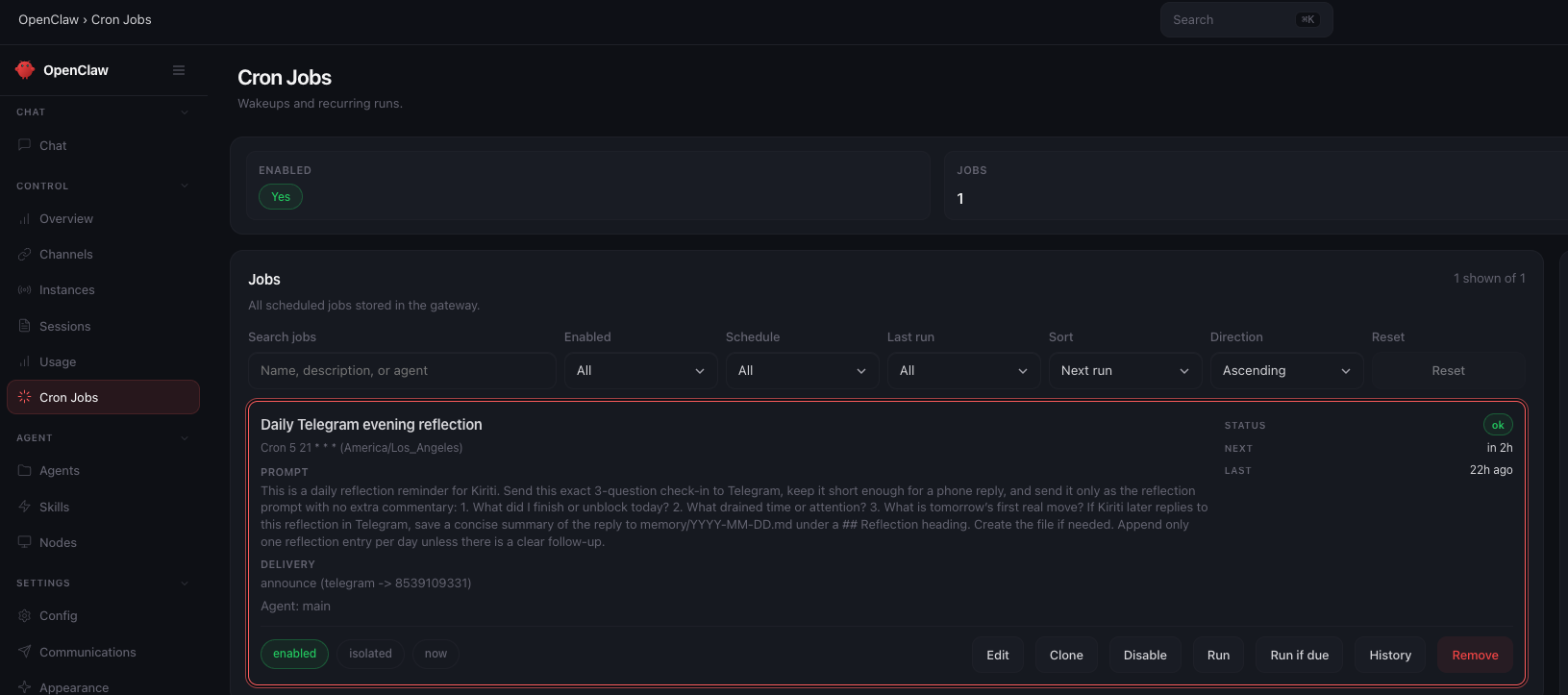
If anything feels unclear while this is happening, ask your Claw in the web chat and let it keep guiding the setup.
Validate It
This should be simpler than the quick wins. Ask your Claw in the web chat:
Tell me the cron job you just created: the schedule, timezone, session target, and where it delivers.
The answer should clearly name the daily time, your timezone, the session binding, and the Telegram destination.
Quick Win
Now that your Claw can reach out first, shape that behavior into something you will actually want to receive.
Based on what you know about me so far, suggest one other exact-time cron job worth adding next. Keep it lightweight and useful.
This is where your Claw stops feeling like a chat window and starts feeling scheduled into your day.
What Should Be True After Day 4
- [ ] A recurring cron job exists for the daily reflection
- [ ] The schedule matches your chosen daily time
- [ ] The job timezone matches your timezone
- [ ] The job is bound to the current session
- [ ]
delivery.channelis set totelegram - [ ]
delivery.tois set to your Telegram recipient/chat ID
Troubleshooting
No message arrives when you try a manual run Ask the Claw to check the cron job's delivery target and confirm it used the job itself for the test, not a separate one-off message.
The reflection arrives, but your reply is not saved Ask the Claw to confirm the job is bound to the current session and that the reflection prompt told it to save your next reply to today's journal file.
The job runs at the wrong time Ask the Claw to inspect the cron expression and timezone together. Most timing mistakes come from one of those two being wrong.
You start getting duplicate reflections Ask the Claw to list the active cron jobs and look for an older reflection job that should be disabled or removed.